MCVSAID, the MultiCam Video Stream AI Director, turns spare Android phones into a managed, self-healing multi-camera rig. One local computer runs it, and an optional AI director can choose the shots by watching each moment before it airs. There is no cloud and no subscription: the cameras, the director and the recordings stay on your own computer, and your footage goes only where you stream it.
Most phone multicam tools stop once the feeds reach a switcher. Most auto-directors either choose shots from audio levels alone or work only with their own cameras. MCVSAID covers the whole chain: setup, health, sync, colour, shot choice and edit-ready recordings. You can steer it at any step in plain language, or out loud. Put a phone on a low-cost gimbal and it becomes a camera you can aim from the dashboard, or one that follows a face by itself. Faces can be blurred on the phone itself, before any picture leaves it.
At a glance
- Multiple dedicated phones, one button: every camera recording or streaming at once.
- No camera operators needed: a handful of spare phones and one computer make a directed multicam show.
- Phones on gimbals become robotic cameras: aimed from the dashboard, following a face or a named performer by themselves, or sent to a saved spot when the host says "show the pot".
- Automation you can switch off mid-show: tracking and the automatic zoom, for one camera or every camera at once.
- A map of any set: a concert stage, a kitchen or a podcast table, made from a few photos, a floor plan or a template, with the cameras placed against it.
- Faces blurred on the camera itself, with the computer as a backup that catches the faces a phone misses.
- Voices that line up with mouths: each camera's sound is measured against its picture and set to match.
- A teleprompter that listens: the script on a tablet, the word being said lit as it is said.
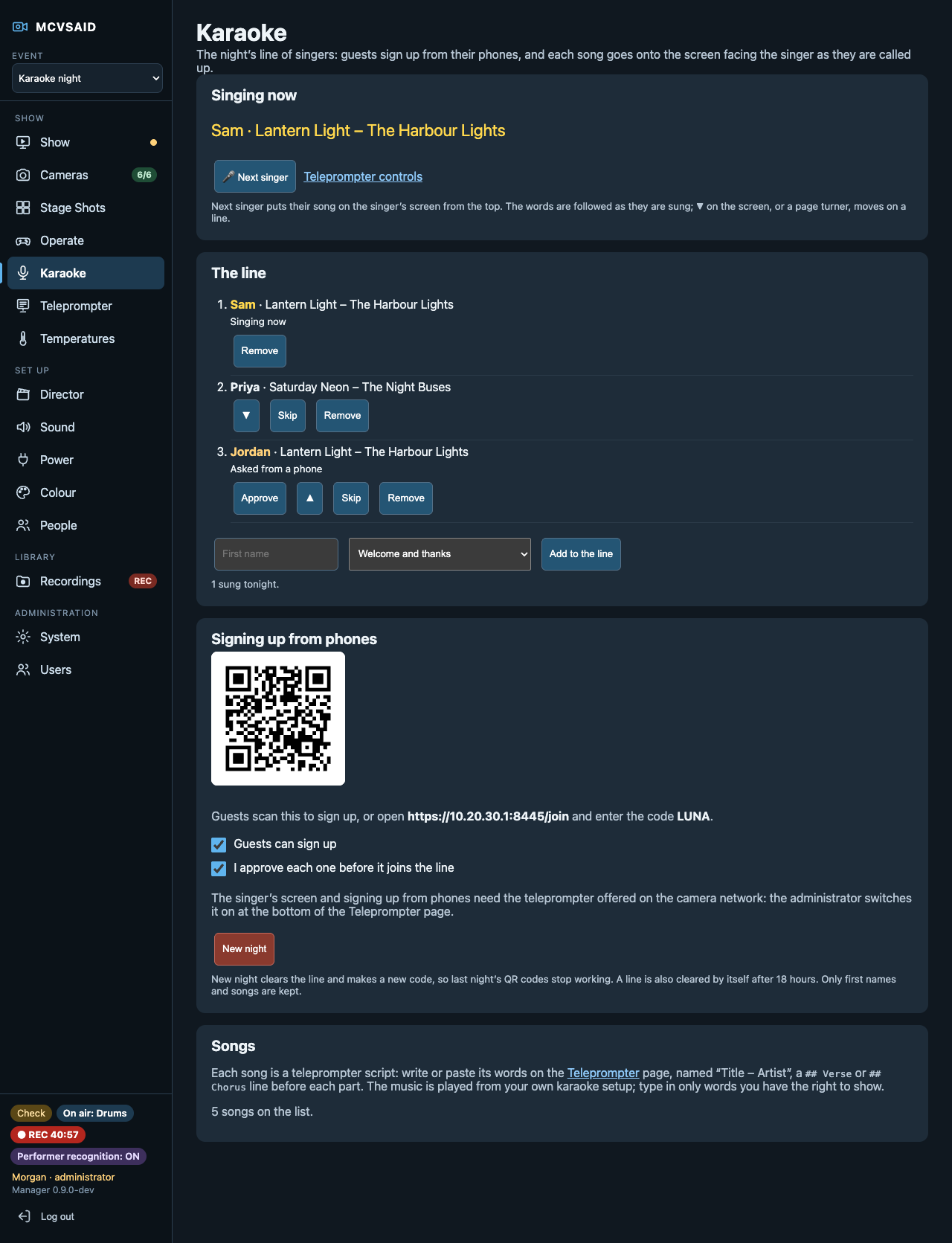
- Karaoke night, run from the dashboard: guests sign up from their phones, and the words go on a screen facing the singer, lit as they are sung.
- An AI director that watches every camera before the audience does, and takes notes in plain English.
- Mount the phones once. Set them up, match their colour, update and fix them from a browser.
- Everyone logs in as themselves: each person has a role, and an administrator can raise, lower or change it.
- Your show, your computer: no cloud, no subscription, and your footage goes only where you stream it.
- The AI's cut is a starting point. Every show comes with each camera's own file and the edit.
What MCVSAID does that others don't
1. Dedicated phones, one button: every camera recording or streaming at once
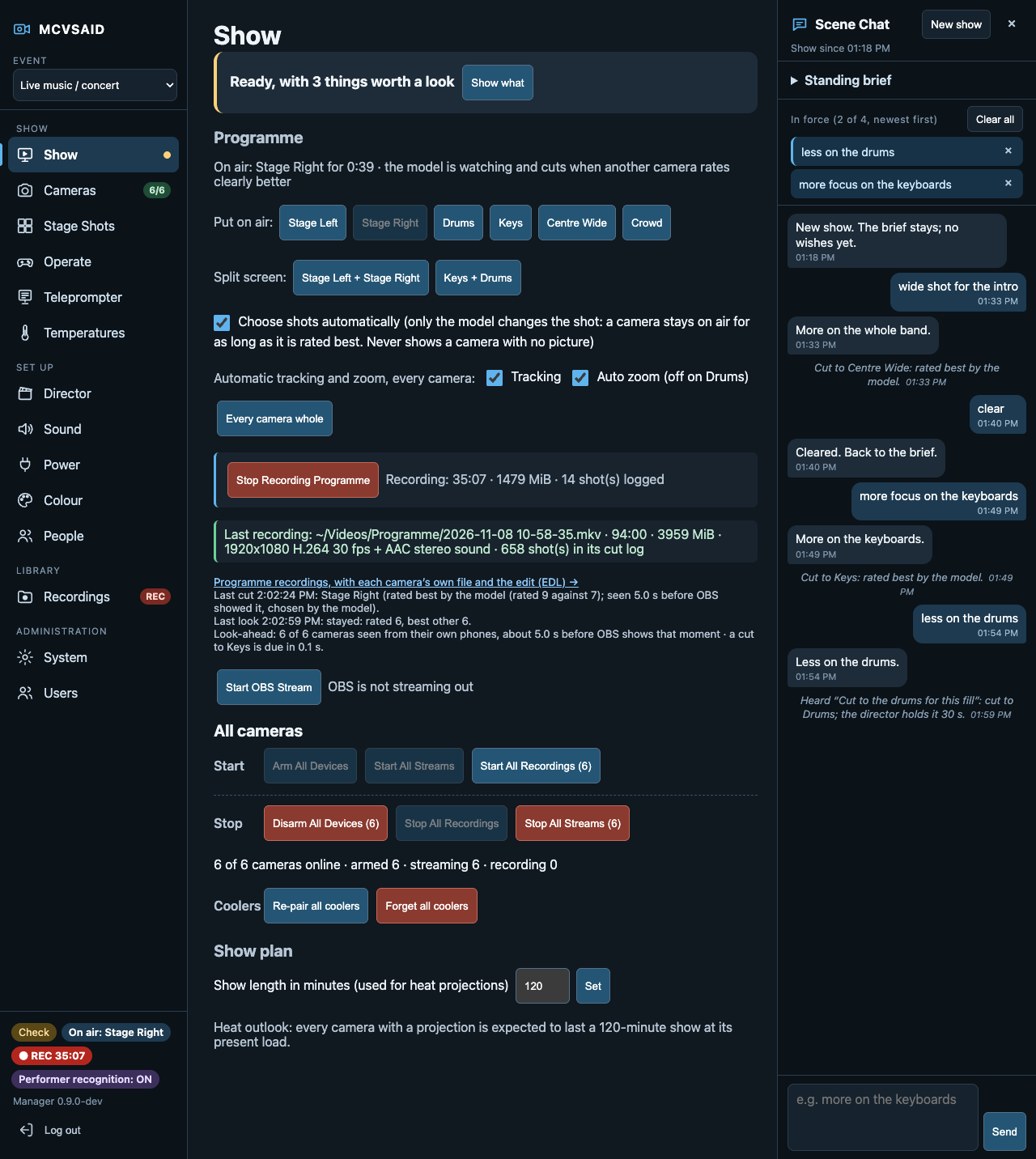
If all you want is several dedicated phones that start recording, streaming, or both at a single button press, MCVSAID is built for you. The Show page arms, starts and stops every camera together, and one readiness line tells you when all of them are good to go.
Getting there is just as simple. A factory-reset phone taps its welcome screen six times, scans a code, installs the signed app and joins the camera network, with no cable needed. From then on it is managed remotely: arm it, restart it, update it one camera at a time, and correct its clock. Each phone revives a frozen picture on its own, rejoins Wi-Fi, holds its battery short of full, and goes silent while armed. Other phone apps assume someone is holding the phone. With MCVSAID you mount the phones once and never touch them again.
2. A director that sees the shot before the audience does
A look-ahead holds the programme a few seconds behind real life. A vision model running on your own computer rates every camera from the phones' own pictures, so each cut lands cleanly on air. In the demo, the model rated six cameras in about half a second, and every cut was seen 0.7 to 5 seconds before OBS showed it. Audio-only switchers react after the fact, and they can't tell an empty or blurry shot from a good one.
3. Directing in plain language, or out loud, mid-show
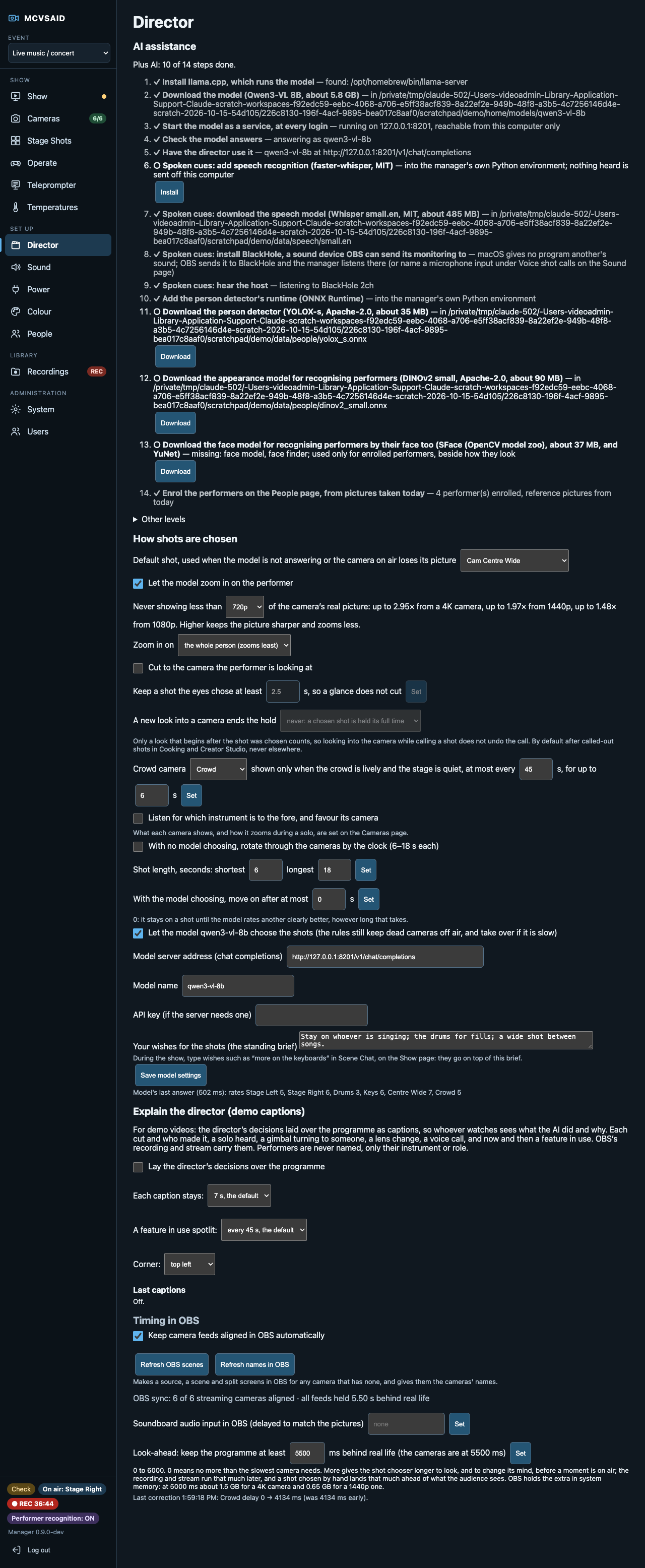
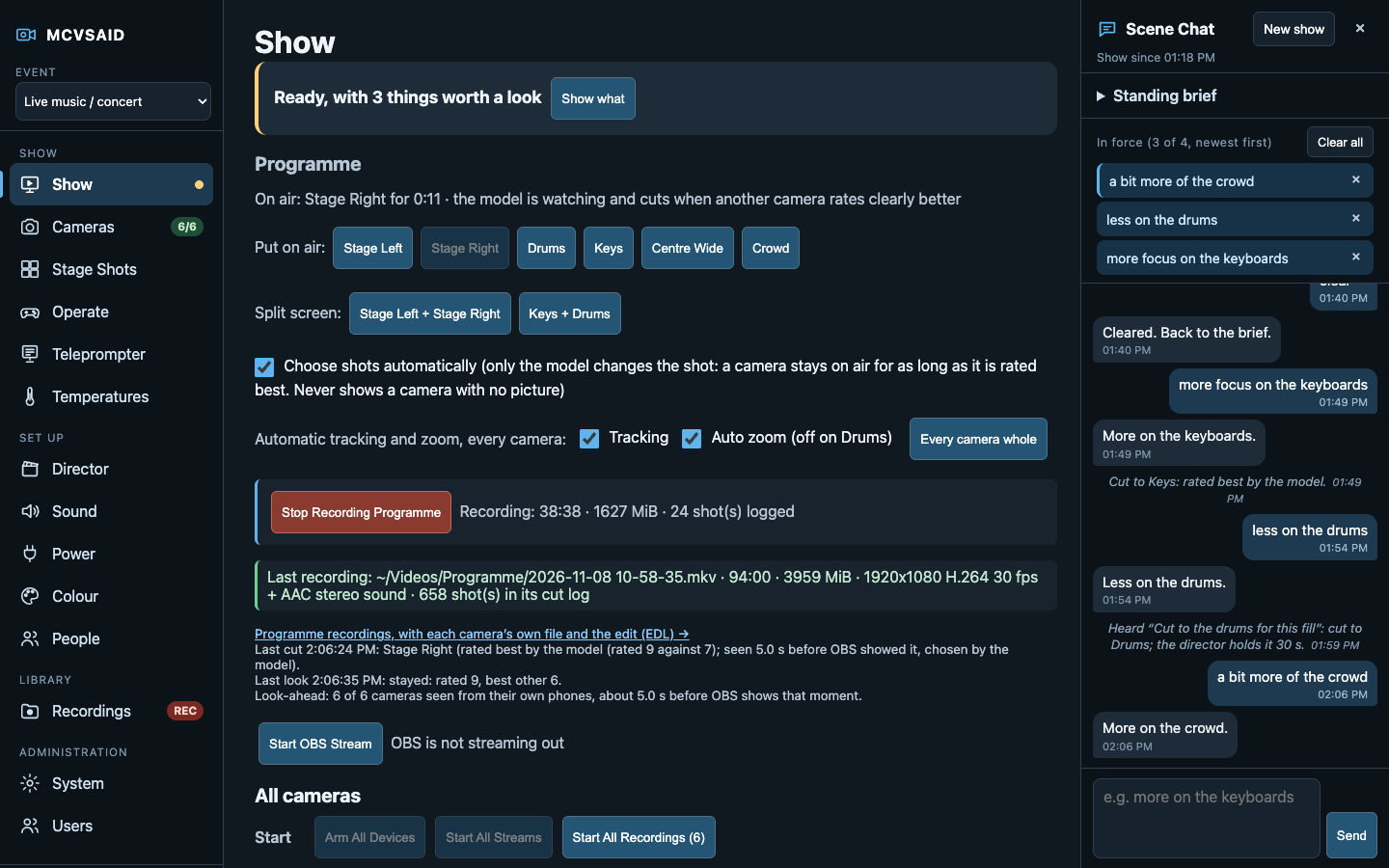
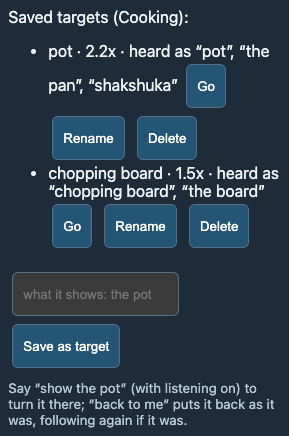
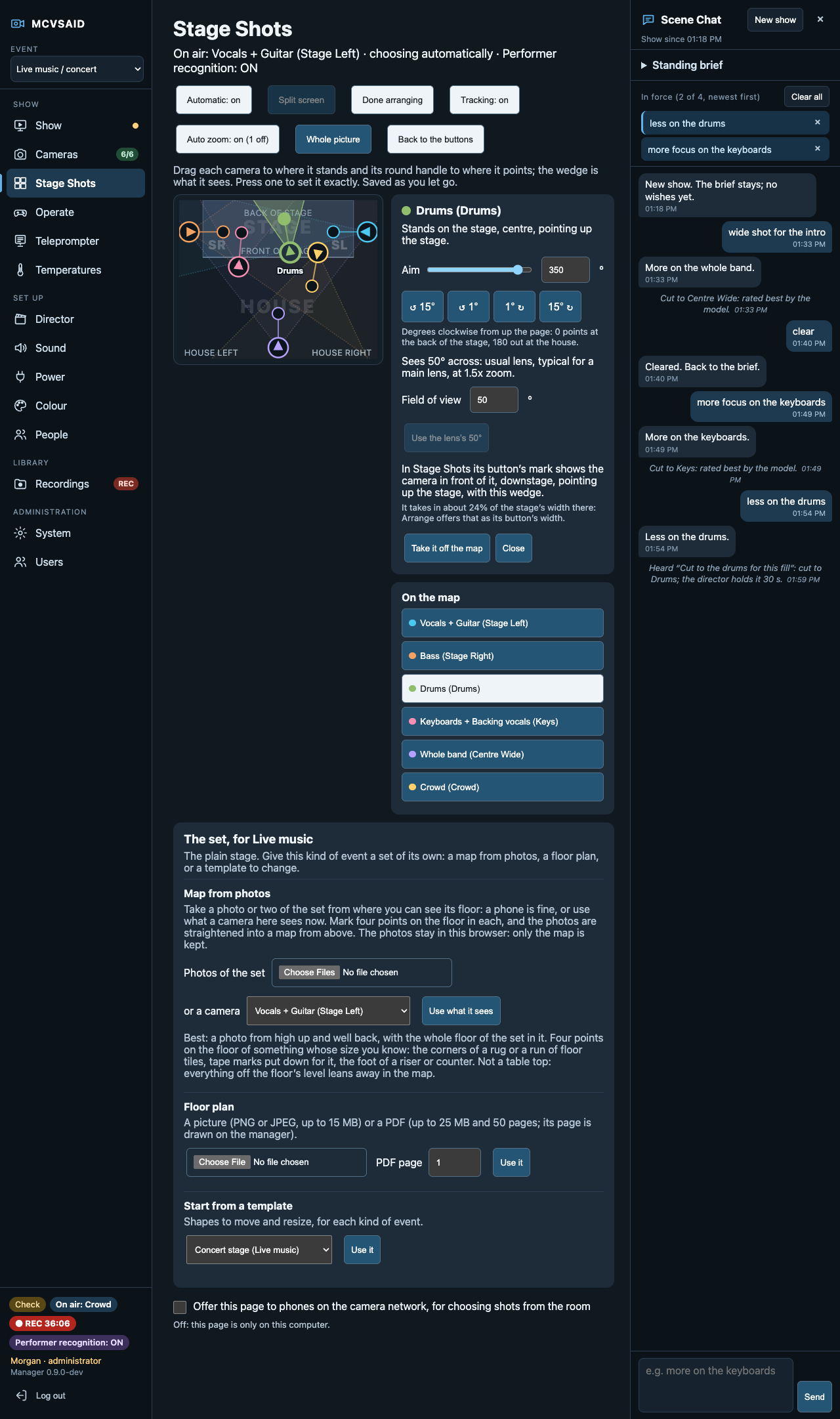
A standing brief sets the intent, for example "stay on whoever is singing; the drums for fills". During the show, Scene Chat takes wishes such as "less on the drums". Up to four wishes are active at once, each lasts 15 minutes, and the log explains every cut. A host can also call shots aloud: say "cut to the overhead" or "show the stove" and the director cuts to that camera and holds it. That's on by default in Cooking and Creator Studio, where one person talks to their own cameras, and off where music or a congregation could set it off by mistake. Speech is recognised on the computer, and nothing heard is sent anywhere or kept. A call only a phone heard waits for the computer to hear it too, and two cameras called in one breath cut to neither, so a misheard word doesn't cut the show. A host can also send a gimbal camera to a spot saved for it: "let's look at the pot now" turns and zooms it there, and "back to me" puts it back on the host as it was. We haven't found another auto-director that takes live direction in words.
4. Shot logic tuned to the kind of event
Live music, worship, podcasts, panels, theatre and cooking each have their own camera roles and pacing. Talk formats cut to whoever is speaking and allow for mic bleed, coughs and pauses. Cooking follows a loaded recipe step by step, makes sure each step's station is seen, and can put the recipe, a QR code and captions on screen, all the time, at key moments or only when asked. Prep for the show turns a long recipe into short steps the cook can call out, checks that a camera covers each one, and lists what to say to rehearse. During the show the cook says "step two" or a step in its own words and the recipe follows, forward or back. Press Record and it starts afresh. Creator Studio lets you build your own framings from body regions.
A teleprompter on a tablet beside the camera, at https://teleprompter.mcvsaid.local behind its own PIN, follows the speaker word by word, karaoke style, by listening on the computer itself. It too suits the event: the recipe's steps in Cooking (and moving with them), lyrics a line at a time at a concert, readings and sermon points at worship, an opening, ad reads and questions on a podcast or panel. A page-turner pedal or an Xbox controller moves it on by hand.
5. Virtual camera operators: zoom, follow, solo, gaze, crowd
The director can crop in on a performer and follow them. It won't zoom in on an empty frame, and it never drops below a resolution you set, such as 1080p. It switches a phone to its telephoto lens only while that camera is off air. It favours the instrument that leads the mix, cuts to whoever a performer is looking at, and shows the crowd only when the crowd is lively and the stage is quiet. With a host it works at a host's pace: it cuts to them just before they turn to their camera, and after a short look goes back to the shot it left. One fixed phone does the work of an operator with a zoom lens.
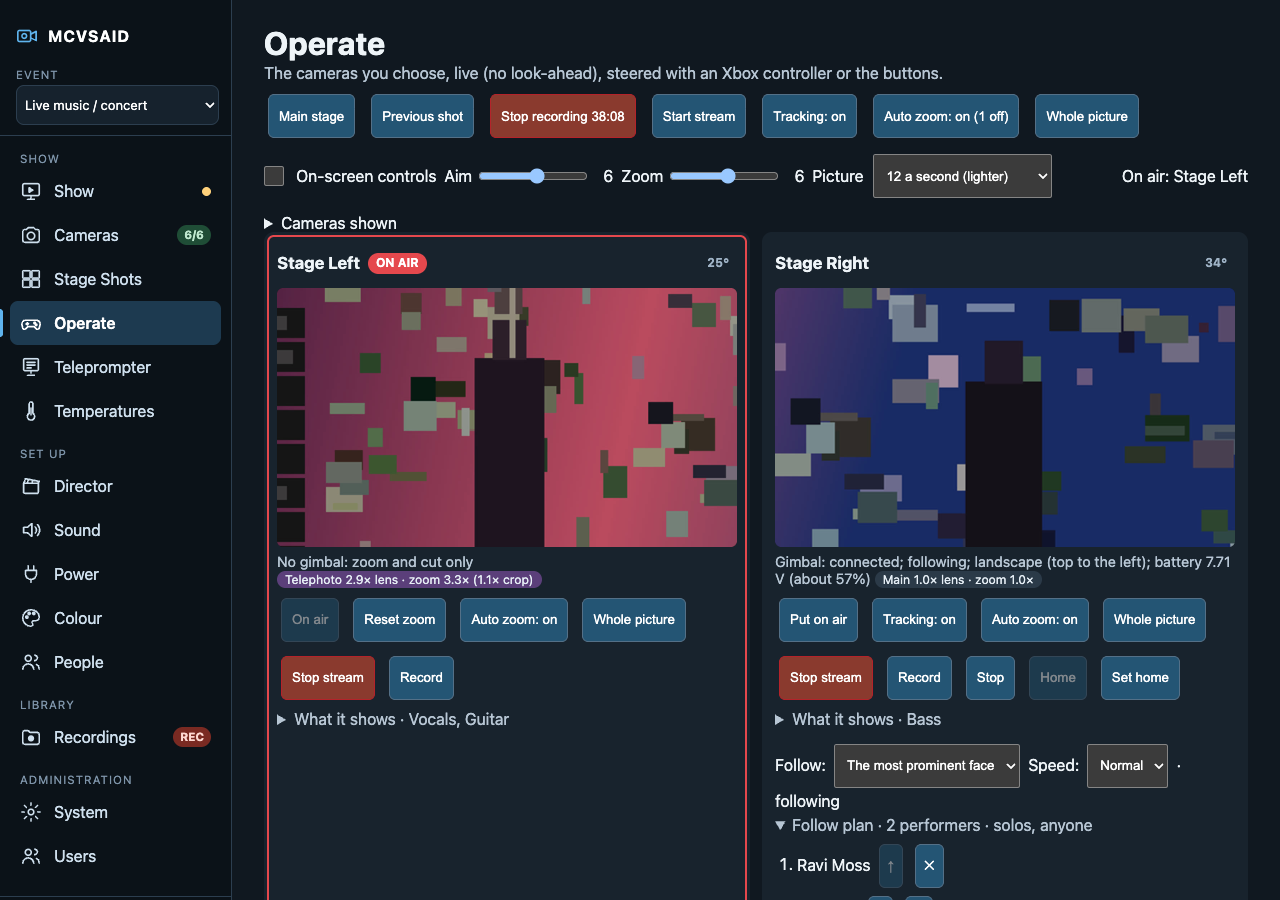
None of this is all or nothing. During the show an operator can switch tracking and the automatic zoom off and on, for one camera or for every camera at once, from the camera cards, the Show page, Stage Shots or the Operate page on a tablet, or by saying "stop tracking" or "auto zoom off". A camera switched off holds its aim and its zoom where they are, and Whole picture puts back a camera's full frame at once.
6. Robotic cameras for the price of a phone gimbal
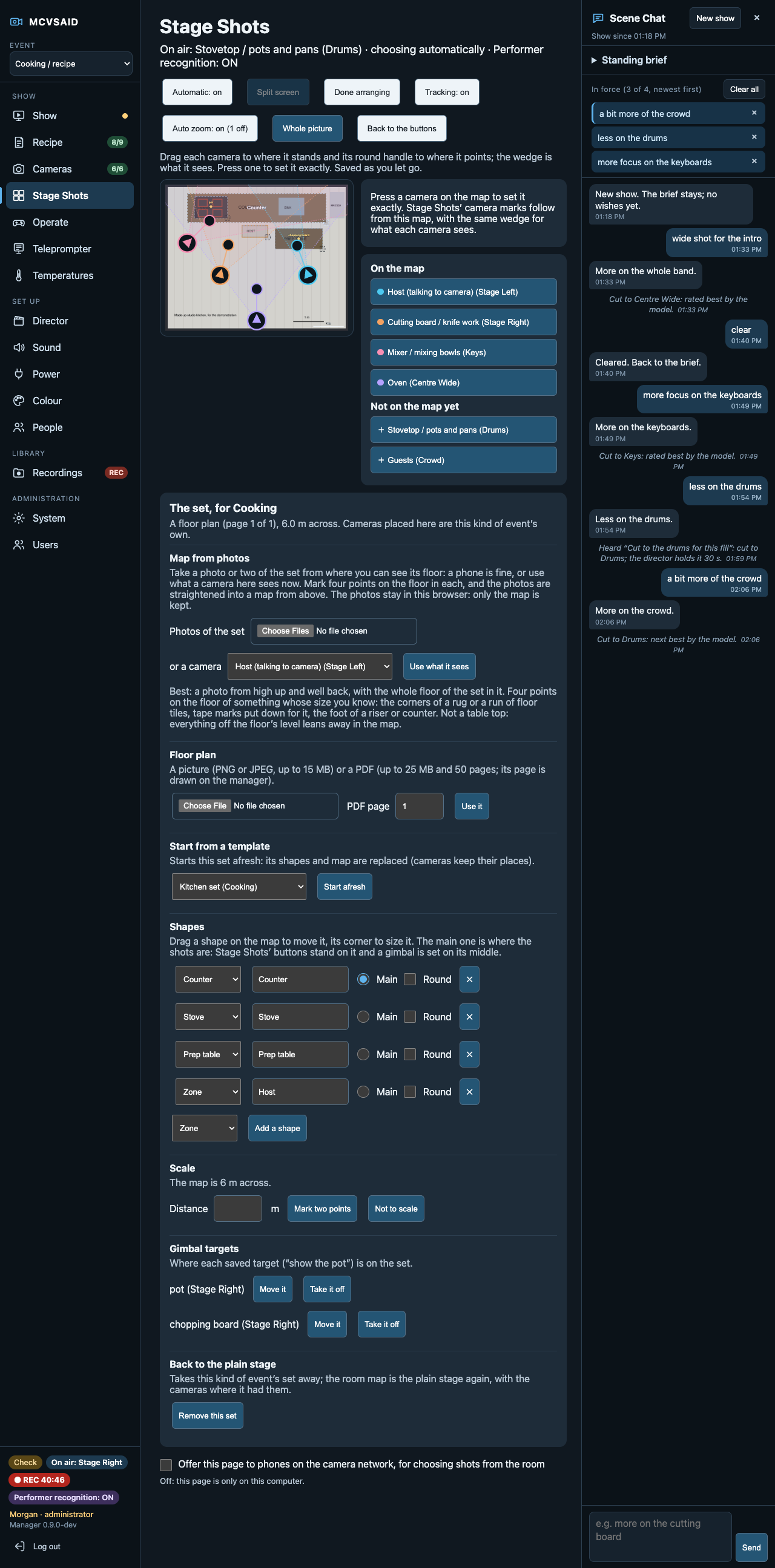
Put a camera phone on a Hohem iSteady X3 or MT3 gimbal, a consumer gimbal costing a small fraction of a PTZ camera, and the camera app drives it over Bluetooth, with no extra box or cable. Hold an arrow on the camera's card and it turns; let go and it eases to a stop. Press Follow and the phone keeps the most prominent face in frame by itself, still following someone who turns away by their body, at a Calm, Normal or Quick pace. With performer recognition on, it can follow a named, consenting performer instead, so the director's zoom on that camera follows them too. Following, it zooms to keep the person about waist up as they walk nearer or further, and turns faster when they are close. It works hung upside down, and the director keeps cutting between this camera and the rest as usual. An X3 also turns the phone between portrait and either landscape from the camera card, recentres, changes its work mode and reports its battery. Saved targets keep the aim and zoom for things on the set, such as the pot, the chopping board or a guitar on its stand, so a camera can be sent there from the card or by voice and brought back. An operator can take over from a tablet with an Xbox controller or on-screen buttons, with the speed set to taste.

7. Faces blurred on the camera, before anything leaves it
For a camera that must never record or send an unblurred face, such as an audience camera, a church congregation or a school event, the phone itself finds and blurs every face before encoding. Its stream, OBS and every recording of that camera are blurred for good, and no unblurred copy exists anywhere. The production computer can act as a backup, watching the same camera a few seconds ahead of the programme and covering any face the phone missed, such as someone walking into shot. The phone reports what it blurred in each frame, so only the misses are added. On the computer alone, faces can be blurred in OBS for every face, everyone except consenting performers, or only chosen people. It's experimental, and we say so plainly: it can miss faces.
8. Heat treated as a first-class problem
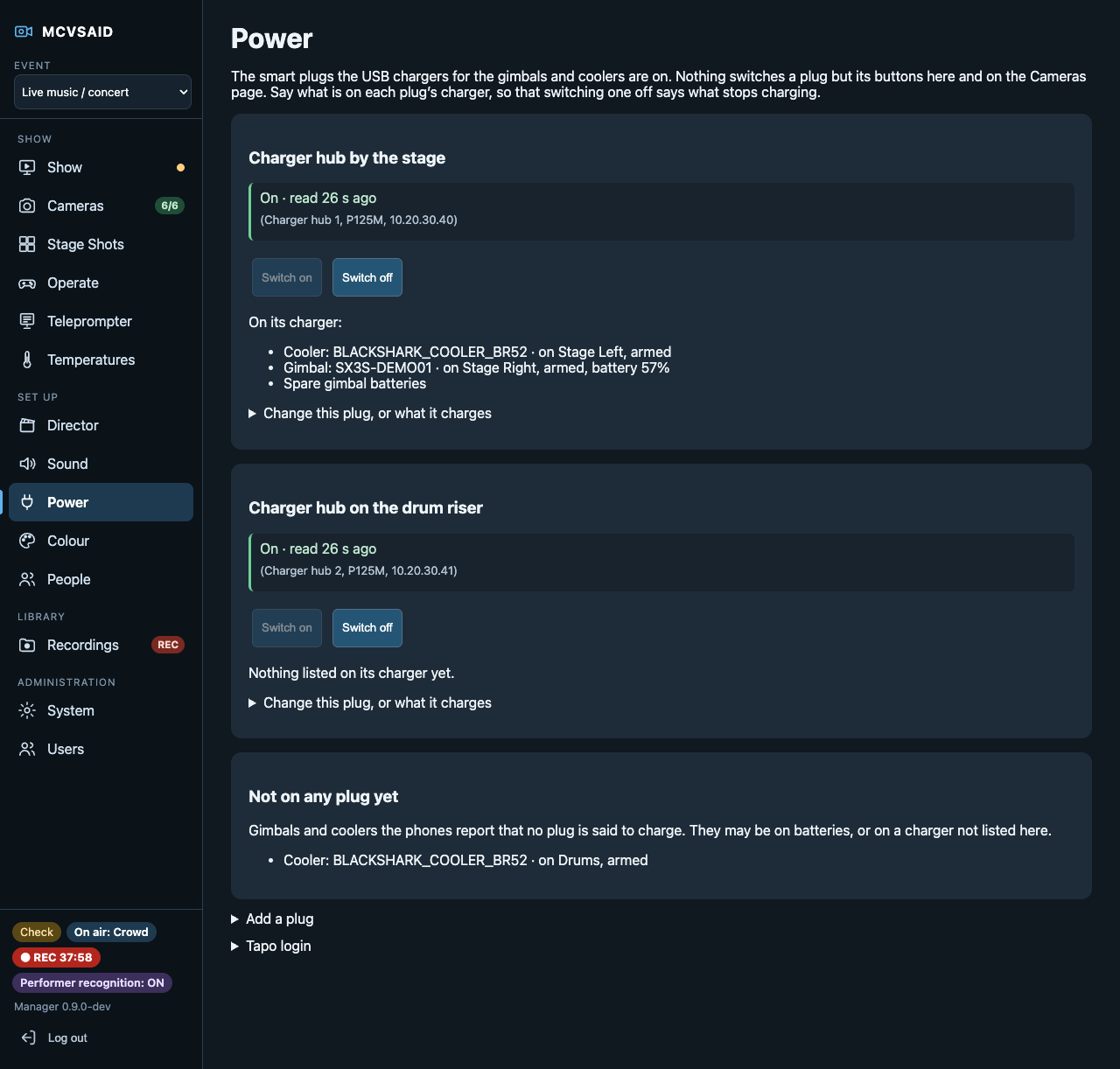
MCVSAID tracks each phone's temperature, its trend and a forecast against the planned show length. You can compare runs side by side. It also controls clip-on Black Shark coolers over Bluetooth, keeps their lights off and keeps their own auto shutdown off, so a cooler doesn't switch itself off mid-show. Coolers are paired, moved between phones or re-paired all at once from the dashboard, each to the phone it is clamped to. The USB hubs that charge the gimbals and coolers can sit on Tapo smart plugs, switched from a Power page that shows what each plug charges and warns before switching off a cooler on an armed camera. In early tests, a Galaxy S23 with a cooler stayed at 22 to 25 °C while streaming and recording 4K for 2¼ hours. Without a cooler, it reached 43 to 44 °C streaming alone.
9. One answer to "are we ready?"
A single readiness line checks the computer, OBS, the network, the camera relay, the model and every camera, then says what needs attention and how to fix it. Stage Shots lays the cameras out as they stand on stage, and a room map shows what each lens sees. Each kind of event can have a set of its own: take a few photos of the set with any phone, mark four floor points round something of known size, and the photos are straightened into a top-down map to scale, in the browser, without the photos ever being uploaded. A floor plan (a picture or a PDF page) or a template for each kind of event works too, from a concert stage with a drum riser to a kitchen counter, stove and prep table. You can share the page with a phone in the crowd, behind a passcode, at an easy address (https://stageshots.mcvsaid.local); the operator's page is at https://operate.mcvsaid.local.
10. Frame-accurate sync, lip sync and colour matching across mixed phones
A hidden timing strip lines every feed up to the frame. Calibrate sync lines the sound up too: hold a phone or tablet that flashes and beeps in front of the cameras, press Measure, and each camera's sound is set to match its own picture, OBS's own delay included. Programme sound can come from one leading microphone, or follow whoever is speaking, so phone microphones never echo. One page sets white balance and exposure on every phone and builds a LUT for each camera. The LUT can come from a colour chart or from matching to a reference camera. The camera relay cut OBS's memory use from 11.0 GB to 2.6 GB with six 4K cameras.
11. Recordings ready for the edit
Record and Stop catch the moment you press them, even though the programme runs a few seconds behind. Each programme recording comes with a file per camera, the cuts as an EDL for Resolve, Premiere or Final Cut, and each camera's LUT; a cooking show's steps come as markers where the file shows them. Recordings made on the phones are copied over and verified after the show. You can re-cut the AI's show instead of living with it.
12. Private, local and consent-based
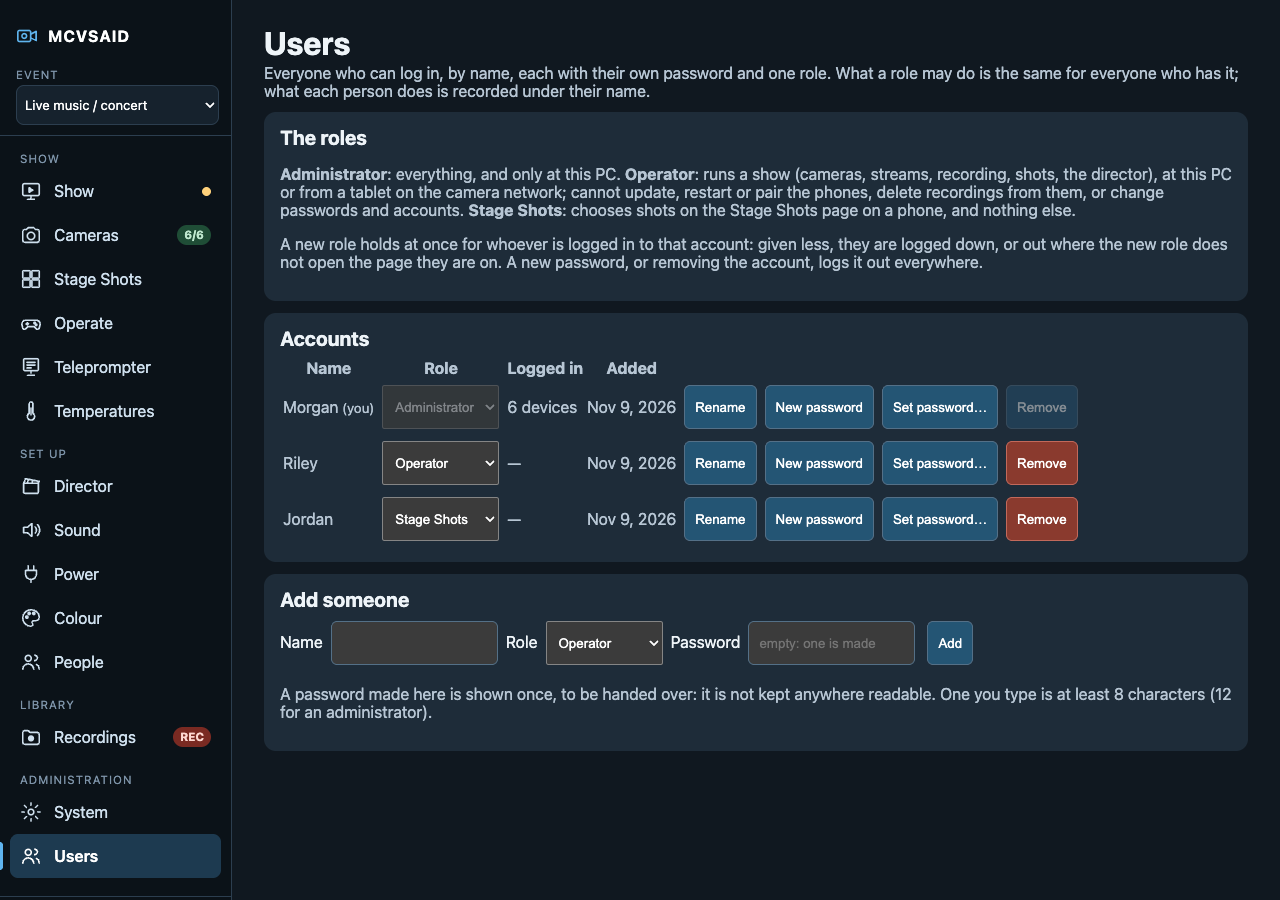
Everything runs on one Mac or Linux computer, including the model, and nothing is sent to the project. Performer recognition identifies only people who have consented, purpose by purpose. Their data is encrypted and deleted after the show day, and every page shows when recognition is on. Face blur and voice shot calls run on the phones and the computer too, never in a cloud service. AI is optional, so a modest computer can still run a show. Each person logs in to the dashboard by name, with a role such as administrator, operator or Stage Shots only, and an administrator can change anyone's role from the Users page. The audit log names who made each change.
How it compares
The comparison below is based on the public pages linked under References, as of October 2026.
| Capability | MCVSAID | Switcher Studio | Blackmagic Camera (Android) | Mevo Multicam | Audio auto-switchers |
|---|---|---|---|---|---|
| Android phones as cameras | Yes, as a managed fleet | Yes, as sources | Yes | No, Mevo cameras only | Needs its own switcher |
| Live switching | Yes, into OBS | Yes, by the operator | No | Yes | Yes, in vMix, ATEM or TriCaster |
| Automatic shot choice | Vision model and rules | Not stated | No | Auto-director | Mic levels |
| Sees the shot before it airs | Yes, look-ahead | No | No | Not stated | No |
| Direction in plain language | Yes, Scene Chat, and shots called aloud | No | No | No | No |
| Phones on gimbals, aimed and following | Yes, X3 and MT3, from the dashboard or by voice | No | No | Not applicable | No |
| Faces blurred on the camera | Yes, with the computer as backup | No | No | No | No |
| Event-specific modes | 7 modes, karaoke included, plus Creator Studio | No | No | Not stated | Talk formats |
| Remote phone management and self-healing | Yes | No | Remote settings | Not applicable | Not applicable |
| Heat forecasting and cooler control | Yes | No | No | No | No |
| Per-camera files, EDL and LUTs | Yes | Not stated | Per-phone files | Not stated | No |
| Runs fully local, no subscription | Yes | No, monthly plan | Yes, free | App with a Pro plan | Yes, one-time licence |
"Not stated" means the pages we reviewed don't mention the feature; it may still exist. Product names belong to their owners. Corrections are welcome at hello@mcvsaid.com.
Requirements and limitations
- A capable production computer. MCVSAID has been tested on a gaming laptop with 32 GB of RAM and 16 GB of VRAM, and on a MacBook Pro with an M5 Pro and 48 GB of RAM. Smaller machines haven't been tested yet.
- Dedicated phones. Camera phones must be spare, factory-reset devices, because the app becomes each phone's device owner.
- Heat. Without a cooler, phone heat still limits recording on the phone during a show.
- Experimental parts. Face blur can miss faces (small, turned, fast-moving or partly hidden), so don't rely on it to hide anyone yet. Cooler and gimbal control use commands worked out from the makers' own apps, so a firmware update could change them; only the Black Shark MagCooler 5 Pro and the Hohem iSteady X3 and MT3 have been tried. An MT3's built-in AI tracker can be seen from the dashboard, but only started and stopped at the gimbal. Charger plug control works with Tapo plugs through their local login, which TP-Link has changed before; a firmware update could break it. Saved targets are for things that stay put: a camera doesn't follow the pot if it's moved.
- Delay. The programme runs a few seconds behind real life, by design, so the director can see each moment first.
- Platforms. Cameras are Android only, output goes through OBS, and MCVSAID is in private beta.
Try it
- Demo: the real dashboard with simulated cameras runs in your browser at demo.mcvsaid.com. Nothing is connected, and nothing you press leaves your browser.
- Join the beta: email beta@mcvsaid.com with what you film and how often, the computer you'd run it on, and the phones and network you have.